Part 1 of the “Orchestrating dbt without dbt Cloud” series.
Introduction
If you’ve been using dbt for a while, you’ve probably hit the moment where dbt build in a cron job stops being enough. You want retries, observability, scheduling, maybe some dependency on upstream data arriving first. The natural answer from dbt Labs is dbt Cloud but dbt Cloud comes with a price tag and a level of vendor lock-in that many teams aren’t comfortable with, and for good reason.
This series covers the main open-source alternatives for orchestrating dbt. We’ll use the exact same dbt project across all articles so you can compare apples to apples. We’re starting with Dagster, and for good reason: of all the orchestrators covered in this series, Dagster has the deepest, most opinionated integration with dbt. If you’re greenfield and dbt is central to your stack, Dagster deserves serious consideration.
The companion repository for this article is available here: 👉 github.com/p-munhoz/dbt-orchestrator-comparison
All the code referenced below lives in orchestrators/dagster/.
Why Dagster?
Most orchestrators treat dbt as a black box. You point them at a dbt build command, they run it, they tell you it passed or failed. That works, but it means your orchestrator has no idea what happened inside dbt which models ran, which tests failed, what the lineage looks like.
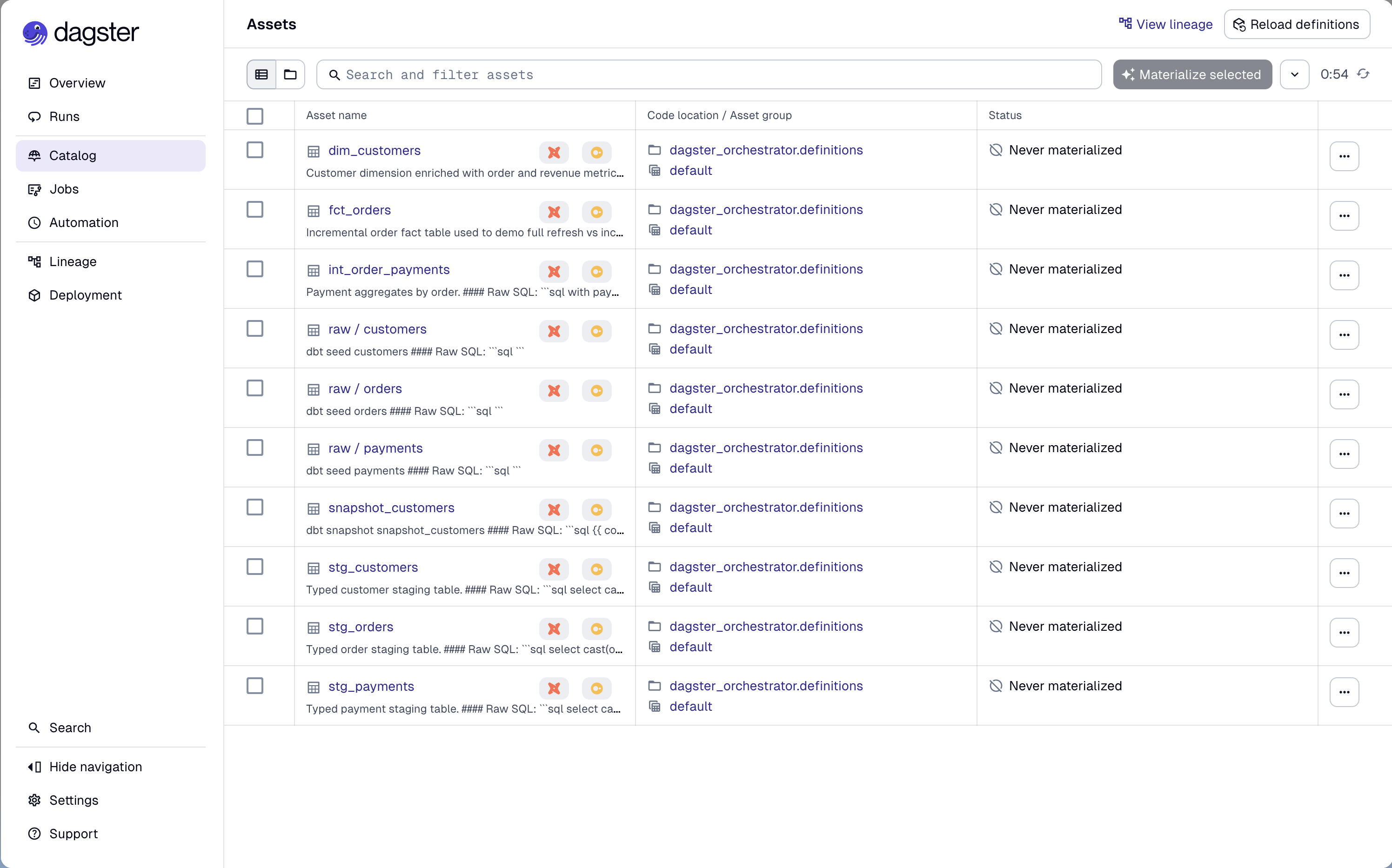
Dagster takes a different approach. Through dagster-dbt, it parses your dbt manifest and turns every dbt node (models, tests, seeds, snapshots) into a Software-Defined Asset (SDA). From Dagster’s perspective, dim_customers isn’t just a step in a pipeline: it’s an asset with known upstream dependencies (stg_customers, fct_orders), metadata and a materialization history.
This makes the Dagster UI genuinely useful: you get a live asset graph that reflects your actual dbt lineage, per-model run status, and the ability to selectively re-materialize parts of your graph.
The tradeoff is that Dagster has a steeper learning curve than something like Prefect. There are concepts to internalize: Assets, Jobs, Schedules, Sensors, Definitions. But once it clicks, the model is extremely powerful.
Core Concepts
Before diving into the code, a quick primer on the Dagster concepts we’ll use:
Software-Defined Assets (SDAs) are the central abstraction in modern Dagster. An asset represents a persistent object in storage like a database table, a file or a model. You declare what it produces, what it depends on and Dagster handles the rest.
Jobs are selections of assets (or ops) that run together. Think of them as the unit of execution, what you schedule or trigger manually.
Schedules attach a cron expression to a job.
Definitions is the top-level object that wires everything together: assets, jobs, schedules, resources. It’s what Dagster loads when it starts.
Resources are shared, configurable dependencies and in our case, the DbtCliResource that knows how to invoke dbt.
Project Structure
The Dagster orchestrator lives under orchestrators/dagster/ in the monorepo:
orchestrators/dagster/
├── pyproject.toml
└── src/
    └── dagster_orchestrator/
        ├── __init__.py
        └── definitions.py   ← everything lives here
The dbt project it orchestrates is the shared dbt_project/ at the root, using DuckDB as the warehouse. This keeps the comparison honest: same SQL, same seeds, same tests across all four orchestrators in the series.
For this tutorial, all Dagster objects live in a single definitions.py file to make the code easy to follow. In a real production environment, you would split your assets, jobs, and schedules into dedicated modules.
Dependencies
# orchestrators/dagster/pyproject.toml
[project]
dependencies = [
  "dagster>=1.11",
  "dagster-webserver>=1.11",
  "dagster-dbt>=0.27",
  "dbt-core>=1.11",
  "dbt-duckdb>=1.10",
]
We’re using uv for dependency management. From the repo root:
uv sync --project orchestrators/dagsterSetting Up the dbt Project in Dagster
The entry point for the dbt integration is DbtProject. It points Dagster to your dbt project and profiles and handles manifest preparation in dev mode:
from pathlib import Path
from dagster_dbt import DbtCliResource, DbtProject

REPO_ROOT = Path(__file__).resolve().parents[4]
DBT_PROJECT_DIR = REPO_ROOT / "dbt_project"
DBT_PROFILES_DIR = DBT_PROJECT_DIR

DBT_PROJECT = DbtProject(
    project_dir=DBT_PROJECT_DIR,
    profiles_dir=DBT_PROFILES_DIR,
)
DBT_RESOURCE = DbtCliResource(
    project_dir=DBT_PROJECT_DIR,
    profiles_dir=DBT_PROFILES_DIR,
)

# Compiles the manifest if running in dev
DBT_PROJECT.prepare_if_dev()
prepare_if_dev() is a convenience method that runs dbt parse if no manifest exists yet. In production you’d typically pre-generate the manifest as part of your deploy step.
Turning dbt Models into Assets
This is where dagster-dbt shines. The @dbt_assets decorator reads the compiled manifest and generates one Dagster asset per dbt node:
from dagster_dbt import DagsterDbtTranslator, dbt_assets
import dagster as dg

class OrchestrationDagsterDbtTranslator(DagsterDbtTranslator):
    def get_asset_key(self, dbt_resource_props):
        asset_key = super().get_asset_key(dbt_resource_props)
        if dbt_resource_props.get("resource_type") == "source":
            return dg.AssetKey(["source", *asset_key.path])
        return asset_key

@dbt_assets(
    manifest=DBT_PROJECT.manifest_path,
    dagster_dbt_translator=OrchestrationDagsterDbtTranslator(),
)
def dbt_all_assets(context: dg.AssetExecutionContext, dbt: DbtCliResource):
    yield from dbt.cli(["build", "--no-partial-parse"], context=context).stream()
A few things worth noting here:
The custom translator prefixes source assets with source/ in the asset key. This is optional, but it keeps sources visually distinct from models in the UI. Without it, sources and models share the same namespace, which can get confusing in larger projects.
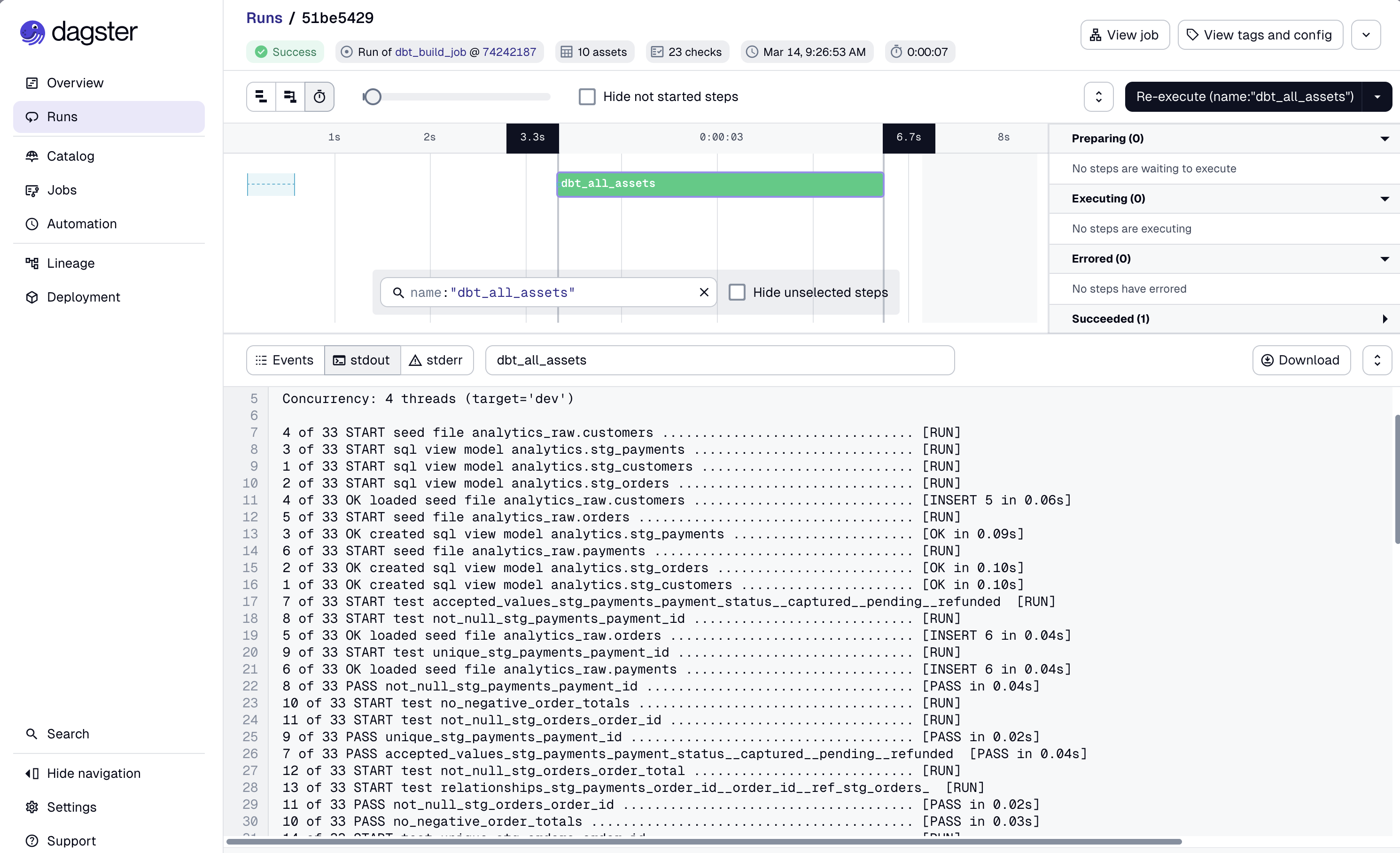
dbt.cli(...).stream() runs dbt as a subprocess and streams events back to Dagster in real time. Each dbt event (model start, model success, test failure) becomes a structured Dagster event. This is what gives you per-model status in the UI rather than a single pass/fail for the whole run.
--no-partial-parse prevents dbt from using a potentially stale partial parse cache. It adds a couple of seconds to startup but avoids subtle bugs when the manifest has changed.
Jobs for Specific Scenarios
dbt_all_assets covers the full dbt build, but you often need more targeted operations: a smoke check, a forced full refresh of a specific model, a source freshness run. For these, we use @dg.op-based jobs.
Smoke Check
A fast health check that seeds data and runs only staging models:
@dg.op(required_resource_keys={"dbt"}, retry_policy=dg.RetryPolicy(max_retries=2, delay=60))
def dbt_smoke_op(context: dg.OpExecutionContext):
    seed_invocation = context.resources.dbt.cli(["seed", "--no-partial-parse"], context=context)
    seed_invocation.wait()
    if not seed_invocation.is_successful():
        raise dg.Failure("dbt seed failed before smoke selector run")

    invocation = context.resources.dbt.cli(
        ["build", "--selector", "smoke", "--no-partial-parse"],
        context=context,
    )
    invocation.wait()
    if not invocation.is_successful():
        raise dg.Failure("dbt smoke selector run failed")

@dg.job(resource_defs={"dbt": DBT_RESOURCE})
def dbt_smoke_job():
    dbt_smoke_op()
The smoke selector is defined in dbt_project/selectors.yml and targets path:models/staging. Staging models are views, so they’re fast to build so they’re perfect for a scheduler heartbeat or a post-deploy sanity check.
Full Refresh of an Incremental Model
fct_orders is an incremental model in the demo project. In production you’ll occasionally need to force a full rebuild (after a schema change, a backfill, or a bad run):
@dg.op(required_resource_keys={"dbt"}, retry_policy=dg.RetryPolicy(max_retries=2, delay=60))
def dbt_full_refresh_fact_orders_op(context: dg.OpExecutionContext):
    invocation = context.resources.dbt.cli(
        ["run", "--select", "fct_orders", "--full-refresh", "--no-partial-parse"],
        context=context,
    )
    invocation.wait()
    if not invocation.is_successful():
        raise dg.Failure("dbt full refresh for fct_orders failed")

@dg.job(resource_defs={"dbt": DBT_RESOURCE})
def dbt_full_refresh_fact_orders_job():
    dbt_full_refresh_fact_orders_op()
This job has no schedule, it’s triggered manually when needed. In the Dagster UI, you can fire it with a single click and watch the logs in real time.
Source Freshness
@dg.op(required_resource_keys={"dbt"}, retry_policy=dg.RetryPolicy(max_retries=1, delay=30))
def dbt_source_freshness_op(context: dg.OpExecutionContext):
    invocation = context.resources.dbt.cli(
        ["source", "freshness", "--no-partial-parse"],
        context=context,
    )
    invocation.wait()
    if not invocation.is_successful():
        raise dg.Failure("dbt source freshness failed")

@dg.job(resource_defs={"dbt": DBT_RESOURCE})
def dbt_source_freshness_job():
    dbt_source_freshness_op()
Wiring Everything Together
All assets, jobs, schedules, and resources are registered in a single Definitions object:
dbt_build_job = dg.define_asset_job(
    "dbt_build_job",
    selection=dg.AssetSelection.assets(dbt_all_assets)
)

defs = dg.Definitions(
    assets=[dbt_all_assets],
    jobs=[
        dbt_build_job,
        dbt_smoke_job,
        dbt_full_refresh_fact_orders_job,
        dbt_source_freshness_job,
    ],
    schedules=[
        dg.ScheduleDefinition(job=dbt_build_job, cron_schedule="0 6 * * *"),
        dg.ScheduleDefinition(job=dbt_smoke_job, cron_schedule="0 * * * *"),
        dg.ScheduleDefinition(job=dbt_source_freshness_job, cron_schedule="0 */6 * * *"),
    ],
    resources={"dbt": DBT_RESOURCE},
)| Job | Schedule | Purpose |
|---|---|---|
dbt_build_job | Daily at 06:00 | Full dbt build for all models and tests |
dbt_smoke_job | Hourly | Staging-only health check |
dbt_source_freshness_job | Every 6 hours | Check source data freshness |
dbt_full_refresh_fact_orders_job | Manual | Force full rebuild of incremental model |
Running It Locally
From the repo root:
uv sync --project orchestrators/dagster

PYTHONPATH=$(pwd)/orchestrators/dagster/src \
  uv run --project orchestrators/dagster \
  dagster dev -m dagster_orchestrator.definitions
Or from inside orchestrators/dagster/:
uv sync
PYTHONPATH=src uv run dagster dev -m dagster_orchestrator.definitions
Open http://127.0.0.1:3000. You should see the Dagster UI with your asset graph populated.
Walkthrough
- Go to Assets: you’ll see the full dbt lineage: sources → staging → intermediate → marts. Each node is a Dagster asset backed by a real dbt model.
-
Go to Jobs →
dbt_smoke_job: launch it manually. Watch the steps:seedruns first, thenbuild --selector smoke. Both stream logs per-invocation. -
Go to Jobs →
dbt_build_job: run the full build. After it completes, go back to Assets and you’ll see materialization timestamps on each asset. -
Go to Jobs →
dbt_source_freshness_job: run freshness. The demo project’ssources.ymldefines warn/error thresholds; the job will reflect those in its status. -
Go to Jobs →
dbt_full_refresh_fact_orders_job: trigger it manually and confirmfct_orderswas rebuilt from scratch (check the logs forCREATE OR REPLACE TABLEinstead of the incrementalDELETE+INSERT).
What You Get Out of the Box
Beyond basic scheduling, the Dagster + dbt combo gives you things that are genuinely hard to replicate elsewhere:
Asset-level observability. In most orchestrators, a dbt run is one task. If 47 out of 50 models succeed and 3 fail, you get one red dot. In Dagster, each model is its own asset with its own status, logs, and materialization history. You know exactly what failed and why without digging through logs.
Retry policies per op. The smoke and build ops in this example have RetryPolicy(max_retries=2, delay=60). Dagster will automatically retry failed ops with the configured backoff, which covers the most common class of transient failures (brief network issues, warehouse timeouts).
Manual triggers with audit trail. Every manual run in Dagster is recorded, when it was triggered, what configuration was used, what the outcome was. Useful when something goes wrong at 3am and you need to reconstruct what happened.
Selective re-materialization. Because dbt models are Dagster assets, you can re-materialize just fct_orders and its downstream dependencies from the UI without writing any new code. No ad-hoc dbt run --select in a terminal.
A Note on the Components API
Dagster docs now prominently feature the Components API (DbtProjectComponent) as the recommended approach for new projects. It’s a higher-level abstraction that reduces boilerplate further.
This article intentionally uses explicit Python definitions (@dbt_assets, @dg.op, @dg.job) because they’re more transparent for a tutorial context. You can see exactly what’s happening at each layer. The Components API is worth exploring once you’re comfortable with the fundamentals, especially if you’re building a larger, multi-team setup.
Pros and Cons
Pros
- Best-in-class dbt integration in the OSS ecosystem, each dbt node is a first-class Dagster asset
- Rich UI with live asset graph, per-model status, and full run history
- Retry policies, sensors, and partitions are built-in and composable
- Strong typing and software engineering patterns (Python-first, no YAML DAGs)
- Active development and a growing ecosystem
Cons
- Steeper learning curve than Airflow or Prefect, the Asset model takes time to internalize
- More infrastructure to run than GitHub Actions or Prefect (Dagster daemon + webserver + database for run storage)
- Smaller community than Airflow, though it’s growing fast
- The Components API is still evolving, some patterns from today’s docs may change
When to Choose Dagster
Dagster is a strong default if:
- dbt is central to your stack and you want native, model-level observability
- Your team is Python-first and values software engineering discipline over drag-and-drop tooling
- You’re building a data platform that will grow, Dagster scales well to multi-team setups with asset groups and code locations
- You want retries, sensors, and partitions without reaching for custom solutions
Consider alternatives if:
- You already have Airflow in production and the switching cost isn’t justified
- Your dbt project is small and a cron job would genuinely be sufficient (see the GitHub Actions article in this series)
- Your team has no Python background and needs a more visual, low-code experience
What’s Next
This is part 1 of the series. The next articles cover:
- Part 2: Orchestrating dbt with Airflow + Astronomer Cosmos
- Part 3: Orchestrating dbt with Prefect
- Part 4: Orchestrating dbt with GitHub Actions
- Part 5: The comparison, how to choose the right tool for your context
All articles use the same dbt project and cover the same scenarios (daily build, smoke check, full refresh, source freshness), so you can compare them directly.
The full repository is at github.com/p-munhoz/dbt-orchestrator-comparison, clone it, run make build from the root, then follow the Dagster README to get started.
Series: Orchestrating dbt without dbt Cloud Part 2: Airflow + Cosmos → · See the full comparison →