Part 4 of the “Orchestrating dbt without dbt Cloud” series.
Introduction
The previous three articles in this series covered Dagster, Airflow, and Prefect. All three are proper orchestrators: they have a server, a UI, scheduling logic, retry handling, and a running process that executes your flows. They are powerful and they are the right tool for complex, production-grade pipelines.
But not every dbt project needs all of that.
If your team is small, your pipeline is straightforward, and you are already using GitHub for version control, there is a legitimate question worth asking before you spin up yet another piece of infrastructure: can GitHub Actions just handle this?
The answer, for a meaningful subset of real-world use cases, is yes.
GitHub Actions gives you cron-based scheduling, secrets management, a run history, failure notifications, and a free execution environment for public repositories. You get all of this without running a single extra server. No daemon to keep alive, no deployment to register, no process that needs to be up before your 6am run.
The tradeoff is real: you lose per-model observability, you cannot retry a single model without re-running the whole job, and the GitHub Actions UI is not built for data workflows. But for a small team running a daily dbt build on a manageable project, those tradeoffs are often acceptable.
This article covers two workflows: a scheduled production run and a Slim CI workflow for pull requests. The companion repository is at github.com/p-munhoz/dbt-orchestrator-comparison.
The workflow files live in .github/workflows/.
How GitHub Actions Scheduling Works
GitHub Actions uses a schedule trigger with a cron expression. Unlike Prefect, there is no server to start, no process to keep alive, and no deployment to register. You push a workflow file to your repository and GitHub takes care of the rest.
on:
  schedule:
    - cron: "0 6 * * *"
This tells GitHub to trigger the workflow every day at 6am UTC. No daemon required.
A few things worth knowing upfront:
Schedules run in UTC. There is no timezone support in the schedule trigger. If your team runs on CET (UTC+1 in winter, UTC+2 in summer), you need to account for the offset manually in your cron expression.
Scheduled workflows only run on the default branch. If you add a schedule trigger to a branch other than main (or whatever your default branch is), GitHub will ignore it.
GitHub does not guarantee exact timing. Under high load, scheduled workflows can be delayed by several minutes. For most data pipelines this is fine. If you need precise timing guarantees, a proper orchestrator is the better fit.
Scheduled workflows are disabled after 60 days of repository inactivity. GitHub will send you an email before disabling them, but it is worth knowing if you are using Actions on a project that goes quiet for a while.
The Scheduled Production Run
# .github/workflows/dbt_run.yml
name: dbt scheduled run

on:
  schedule:
    - cron: "0 6 * * *"
  workflow_dispatch:

jobs:
  dbt-build:
    runs-on: ubuntu-latest

    steps:
      - name: Checkout repository
        uses: actions/checkout@v4

      - name: Install uv
        uses: astral-sh/setup-uv@v5

      - name: Install dependencies
        run: uv sync

      - name: Run dbt seed
        run: uv run dbt seed --project-dir dbt_project --profiles-dir dbt_project
        env:
          DUCKDB_PATH: ./orchestration.duckdb

      - name: Run dbt build
        run: uv run dbt build --project-dir dbt_project --profiles-dir dbt_project
        env:
          DUCKDB_PATH: ./orchestration.duckdb

      - name: Run dbt source freshness
        run: uv run dbt source freshness --project-dir dbt_project --profiles-dir dbt_project
        env:
          DUCKDB_PATH: ./orchestration.duckdb
A few things to note here.
workflow_dispatch adds a manual trigger button in the GitHub Actions UI. This is the equivalent of the manual trigger on the full refresh DAG in the Airflow and Dagster setups. You can kick off a run at any time without waiting for the schedule.
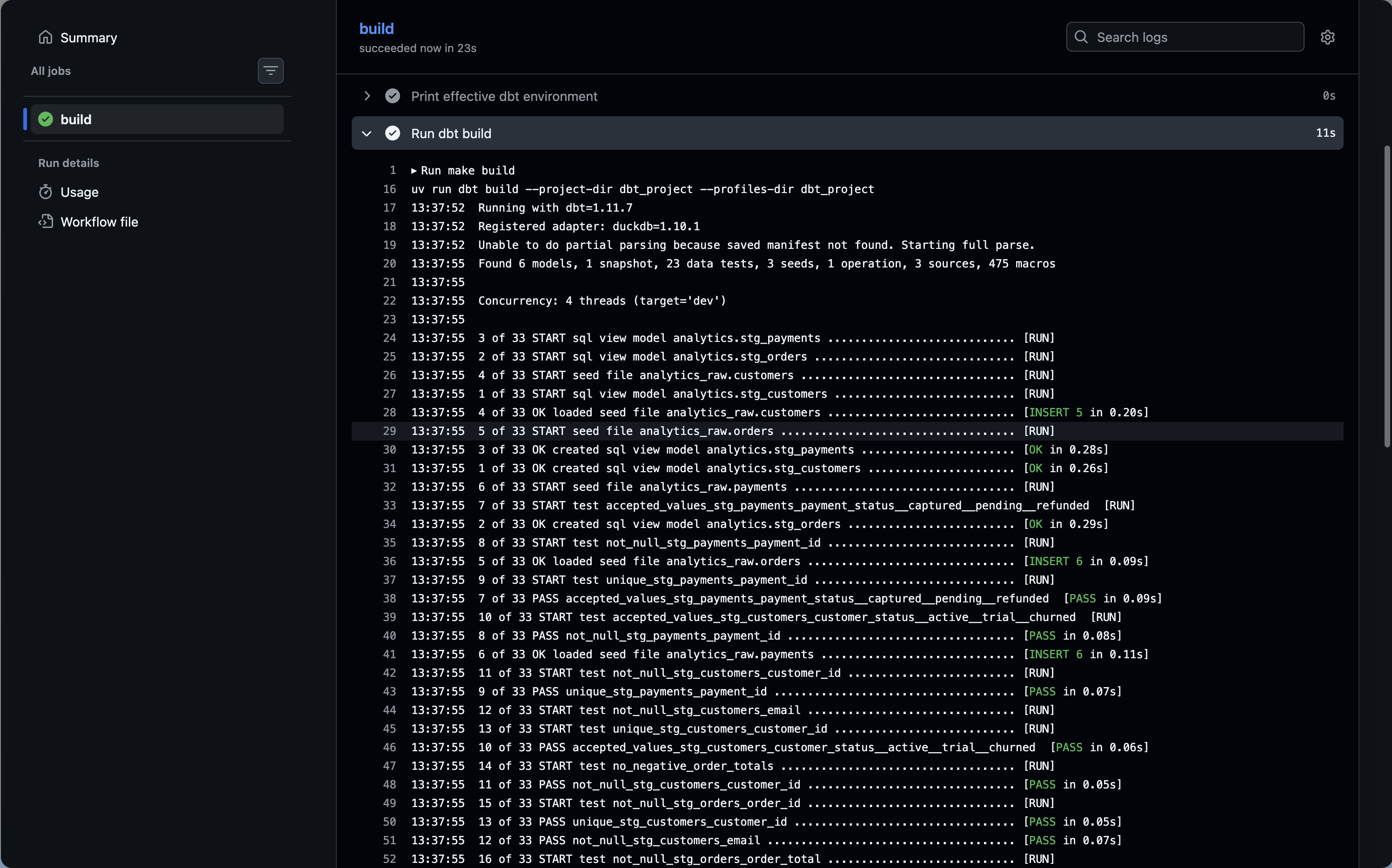
Each dbt command is its own step. This is deliberate. If dbt seed fails, the workflow stops there and you know immediately which step failed without reading through a combined log. GitHub shows each step with its own status indicator, duration, and collapsible logs.
uv sync before running dbt ensures your dependencies are installed from the lockfile. Combined with astral-sh/setup-uv, this is fast because uv caches aggressively and only reinstalls when the lockfile changes.
DUCKDB_PATH is set per step rather than at the job level. In a real production setup you would replace this with your actual warehouse credentials stored as GitHub Secrets, and reference them with ${{ secrets.MY_SECRET }}.
Handling Secrets and Credentials
In the demo project we use DuckDB, which needs only a file path. In production you would be connecting to a real warehouse. The pattern is the same across all of them: store credentials as GitHub Secrets and inject them as environment variables.
- name: Run dbt build
  run: uv run dbt build --project-dir dbt_project --profiles-dir dbt_project
  env:
    DBT_SNOWFLAKE_ACCOUNT: ${{ secrets.SNOWFLAKE_ACCOUNT }}
    DBT_SNOWFLAKE_USER: ${{ secrets.SNOWFLAKE_USER }}
    DBT_SNOWFLAKE_PASSWORD: ${{ secrets.SNOWFLAKE_PASSWORD }}
    DBT_SNOWFLAKE_DATABASE: ${{ secrets.SNOWFLAKE_DATABASE }}
    DBT_SNOWFLAKE_SCHEMA: ${{ secrets.SNOWFLAKE_SCHEMA }}
Your profiles.yml would reference these with env_var():
my_project:
  target: prod
  outputs:
    prod:
      type: snowflake
      account: "{{ env_var('DBT_SNOWFLAKE_ACCOUNT') }}"
      user: "{{ env_var('DBT_SNOWFLAKE_USER') }}"
      password: "{{ env_var('DBT_SNOWFLAKE_PASSWORD') }}"
      database: "{{ env_var('DBT_SNOWFLAKE_DATABASE') }}"
      schema: "{{ env_var('DBT_SNOWFLAKE_SCHEMA') }}"
      warehouse: transforming
      threads: 4
GitHub Secrets are encrypted at rest, never exposed in logs, and scoped to your repository or organization. For most teams this is a perfectly adequate secrets management solution.
The Slim CI Workflow
The scheduled run covers production. The CI workflow covers pull requests: every time someone opens or updates a PR, you want to validate that their changes do not break anything.
The naive approach is to run dbt build on the full project for every PR. That works but it is slow and expensive. The better approach is Slim CI: use state:modified+ to build only the models that changed and their downstream dependencies, deferring everything else to the production state.
This requires having production artifacts (specifically manifest.json) available for comparison. The workflow below uploads them after every production run and downloads them before the CI run.
# .github/workflows/dbt_run.yml (updated to upload artifacts)
      - name: Upload dbt artifacts
        if: always()
        uses: actions/upload-artifact@v4
        with:
          name: dbt-artifacts
          path: dbt_project/target/
          retention-days: 7
# .github/workflows/dbt_ci.yml
name: dbt CI
on:
pull_request:
branches:
- main
jobs:
dbt-ci:
runs-on: ubuntu-latest
steps:
- name: Checkout repository
uses: actions/checkout@v4
- name: Install uv
uses: astral-sh/setup-uv@v5
- name: Install dependencies
run: uv sync
- name: Download production artifacts
uses: dawidd6/action-download-artifact@v6
with:
name: dbt-artifacts
path: dbt_project/target/prod-state/
workflow: dbt_run.yml
branch: main
continue-on-error: true
- name: Run dbt seed
run: uv run dbt seed --project-dir dbt_project --profiles-dir dbt_project
env:
DUCKDB_PATH: ./ci.duckdb
- name: Run dbt build (Slim CI)
run: |
if [ -f dbt_project/target/prod-state/manifest.json ]; then
echo "Production manifest found, running Slim CI"
uv run dbt build \
--project-dir dbt_project \
--profiles-dir dbt_project \
--select state:modified+ \
--defer \
--state dbt_project/target/prod-state
else
echo "No production manifest found, running full build as fallback"
uv run dbt build \
--project-dir dbt_project \
--profiles-dir dbt_project
fi
env:
DUCKDB_PATH: ./ci.duckdbA few things worth explaining here.
continue-on-error: true on the artifact download means the CI workflow does not fail if no production artifacts exist yet, which happens on a brand new repository before the first production run has completed. The shell script that follows handles this gracefully with a fallback to a full build.
DUCKDB_PATH: ./ci.duckdb uses a separate database file from production (orchestration.duckdb). In a real warehouse setup you would point CI at a dedicated CI schema or database to avoid polluting production data.
The if/else fallback is a pragmatic pattern for teams that are just getting started. The first few PRs before the first production run will trigger a full build, and then Slim CI kicks in automatically once artifacts exist. You do not need to manually seed the state.
dawidd6/action-download-artifact is a community action that can download artifacts from a different workflow run on the same repository. The built-in actions/download-artifact only works within the same workflow run, which is not useful here.
A Note on DuckDB and --defer: The Slim CI workflow above uses -defer to resolve upstream dependencies without rebuilding them. Because this demo uses DuckDB, the actual production database file (orchestration.duckdb) does not exist in the ephemeral GitHub runner. If dbt tries to read from a deferred upstream model, it will fail because the local file is missing. In a real production environment using a cloud data warehouse (Snowflake, BigQuery, Redshift), --defer points to your remote database and this exact workflow pattern works perfectly.
Failure Notifications
GitHub Actions can send notifications natively through the GitHub UI: anyone watching the repository will get an email when a workflow fails. But for a scheduled workflow running at 6am, you probably want something more proactive.
The simplest approach is a Slack notification on failure:
      - name: Notify Slack on failure
        if: failure()
        uses: slackapi/slack-github-action@v2
        with:
          webhook: ${{ secrets.SLACK_WEBHOOK_URL }}
          webhook-type: incoming-webhook
          payload: |
            {
              "text": "dbt build failed on ${{ github.ref_name }}",
              "attachments": [
                {
                  "color": "danger",
                  "text": "Run: ${{ github.server_url }}/${{ github.repository }}/actions/runs/${{ github.run_id }}"
                }
              ]
            }
if: failure() means this step only runs if a previous step in the job failed. It will not fire on successful runs.
For email notifications without Slack, GitHub’s built-in notification settings are often sufficient: go to your repository settings, then Notifications, and configure who gets emailed on workflow failures.
Full Workflow Reference
Putting it all together, here is the complete scheduled run workflow with artifact upload and Slack notification:
# .github/workflows/dbt_run.yml
name: dbt scheduled run

on:
  schedule:
    - cron: "0 6 * * *"
  workflow_dispatch:

jobs:
  dbt-build:
    runs-on: ubuntu-latest

    steps:
      - name: Checkout repository
        uses: actions/checkout@v4

      - name: Install uv
        uses: astral-sh/setup-uv@v5

      - name: Install dependencies
        run: uv sync

      - name: Run dbt seed
        run: uv run dbt seed --project-dir dbt_project --profiles-dir dbt_project
        env:
          DUCKDB_PATH: ./orchestration.duckdb

      - name: Run dbt build
        run: uv run dbt build --project-dir dbt_project --profiles-dir dbt_project
        env:
          DUCKDB_PATH: ./orchestration.duckdb

      - name: Run dbt source freshness
        run: uv run dbt source freshness --project-dir dbt_project --profiles-dir dbt_project
        env:
          DUCKDB_PATH: ./orchestration.duckdb

      - name: Upload dbt artifacts
        if: always()
        uses: actions/upload-artifact@v4
        with:
          name: dbt-artifacts
          path: dbt_project/target/
          retention-days: 7

      - name: Notify Slack on failure
        if: failure()
        uses: slackapi/slack-github-action@v2
        with:
          webhook: ${{ secrets.SLACK_WEBHOOK_URL }}
          webhook-type: incoming-webhook
          payload: |
            {
              "text": "dbt build failed on ${{ github.ref_name }}",
              "attachments": [
                {
                  "color": "danger",
                  "text": "Run: ${{ github.server_url }}/${{ github.repository }}/actions/runs/${{ github.run_id }}"
                }
              ]
            }
What You Get and What You Give Up
It is worth being direct about the gap between GitHub Actions and a proper orchestrator, because the gap is real.
What you get:
- Zero infrastructure to maintain
- Native git integration: your pipeline lives in the same repo as your dbt project, versioned alongside it
- Free for public repos, and the free tier for private repos covers a meaningful workload
- Secrets management built in
- A run history that is easy to share with non-technical stakeholders (“here is the link to the failed run”)
- Slim CI with
state:modified+without any additional tooling
What you give up:
- Per-model observability: a dbt run is one step, not a graph of individual model statuses
- Retry granularity: you can retry the whole job from the GitHub UI, but you cannot retry just the model that failed
- Complex scheduling: no dependencies between jobs beyond simple sequential steps, no sensors, no event-driven triggers
- Long-running processes: GitHub Actions has a 6 hour job limit, which is rarely a problem for dbt but worth knowing
- A dedicated UI built for data workflows: the GitHub Actions UI is functional but not designed for the kind of monitoring a data team does daily
For a team of one or two people running a daily build on a project with under 100 models, most of these tradeoffs are acceptable. For a larger team or a more complex pipeline, they are not.
Pros and Cons
Pros
- Truly zero infrastructure: no server, no daemon, no process to keep alive
- Scheduling just works: push the workflow file and GitHub handles the rest
- Everything lives in git alongside your dbt project
- Free for most use cases
- Slim CI is easy to implement and well documented
Cons
- No per-model observability: one step, one log, pass or fail
- No retry at the model level
- No complex dependency graphs or event-driven triggers
- GitHub Actions is not built for data monitoring workflows
- Scheduled workflows can be silently disabled after 60 days of repository inactivity
- Timing is not guaranteed: runs can be delayed under high GitHub load
When to Choose GitHub Actions
GitHub Actions is the right call if:
- You are a solo practitioner or a very small team with a manageable dbt project
- You want to get something running today without learning a new tool
- Your pipeline is essentially a daily
dbt buildwith no complex dependencies - You are already paying for GitHub and want to minimize the number of moving parts
Consider a proper orchestrator if:
- You need to know which specific model failed without reading through logs
- Your pipeline has non-trivial dependencies or event-driven triggers
- Your team is growing and you need the kind of observability that scales with the project
- You have already hit the limitations above and are working around them
What’s Next
This is part 4 of the series. The final article covers the full comparison across all four orchestrators with a decision framework to help you pick the right tool for your context.
The full repository is at github.com/p-munhoz/dbt-orchestrator-comparison.
Subscribe to the newsletter to get the comparison article when it drops.
Series: Orchestrating dbt without dbt Cloud ← Part 3: Prefect · Part 5: Full comparison →